DocSend Alternative for Secure Sharing (2026) | Sendpaper

If you are looking for a DocSend alternative that offers secure document sharing with analytics at a fraction of the cost, you are not alone. DocSend has been the go-to for pitch deck tracking and investor updates, but its pricing (Advanced plans around $150-$250/month, often $6,000+ per year) pushes many startups, VC associates, and sales teams to seek options that deliver the same outcomes without the same bill. Sendpaper is open source and gives you pitch deck sharing with analytics, document analytics, access control, and a virtual data room for due diligence, all on one platform. This guide explains why teams switch from DocSend, what Sendpaper offers in 2026, and how to get started with a free plan.
Why Teams Look for a DocSend Alternative in 2026
DocSend helped define the category of tracked document sharing. For founders sending pitch decks and sales teams sharing proposals, it solved a real problem: see who opened your link, when, and for how long. But three factors are driving teams to look elsewhere.
Pricing No Longer Fits Early-Stage Budgets
DocSend has no free tier. Personal plans start around $10-$15/user/month with limited analytics. Standard jumps to $45-$65/user/month. Advanced and Advanced Data Rooms run $150-$300/month, often $6,000 or more per year. For seed-stage startups and small sales teams, that cost is hard to justify when alternatives offer comparable features at lower price points.
Document Sharing and Data Rooms Are Split
If you need both single-document links and a full data room for due diligence, DocSend pushes you into higher tiers or separate tools. Many DocSend alternatives combine documents and data rooms in one product, so you can start with pitch deck links and add a data room when investors request materials.
Post-Dropbox Acquisition Concerns
DocSend was acquired by Dropbox in 2021. Some users worry about product direction, roadmap changes, or consolidation into Dropbox workflows they do not need. Sendpaper is open source and independent. You can inspect the code, self-host, and avoid lock-in.
What Startups and VCs Actually Need
Regardless of tool choice, the core needs are consistent: a single link for your deck that stays current when you update the file, visibility into who opened and for how long, and the ability to graduate to a full data room when investors request financials or diligence. Investors spend roughly two to four minutes on pitch decks; about 22% reach the final slide. Knowing which slides get attention and when someone stops reading helps you time follow-ups and refine your narrative. Tools with document analytics can increase partner meeting rates and shorten time to term sheet. The best DocSend alternative delivers these outcomes without forcing you into a pricing tier that does not fit early-stage budgets.
What Sendpaper Offers as a DocSend Alternative
Sendpaper is open source and built as a modern DocSend alternative for startups, VCs, and sales teams. You get secure document sharing with the controls and analytics you expect, plus a native virtual data room when you need it.
Pitch Deck Sharing With Analytics
Share your pitch deck with one link. See who opened it, when, from which device, and how long they spent per page. Page-by-page analytics show which slides get the most attention, so you can prioritize follow-ups and refine your narrative. Real-time notifications tell you when an investor opens your deck.
Secure Document Links With Full Control
Every link supports password protection, link expiry, email allow list, block list, and view-only (no download). Share link access control gives you one place to configure who can open the link, when it stops working, and whether you get notified. Links and documents are encrypted at rest.
Virtual Data Room for Startups and Due Diligence
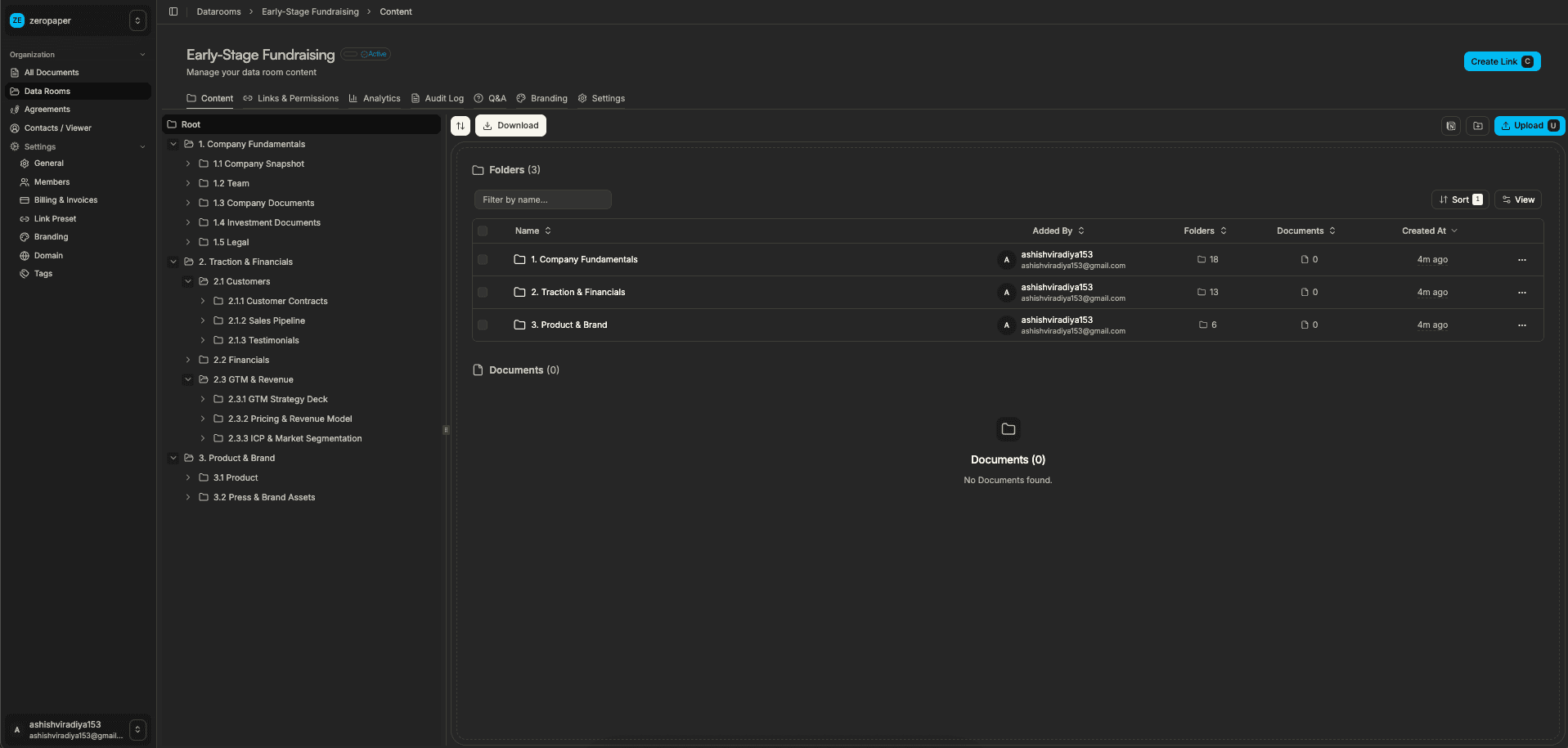
When investors request a data room, you do not need a second tool. Create a data room in Sendpaper, organize documents in folders, set granular permissions, and share one link. Data rooms include Q&A, audit logs (on Dataroom Advance and Enterprise), and per-room branding. From pitch deck to term sheet, one platform.
Sales Proposals and Deal Rooms
Sales teams use Sendpaper to share proposals, one-pagers, and case studies. Track when prospects open links, which sections they view, and how long they engage. Use access control to restrict links to specific domains or require email before access. Sales and proposals workflows are supported out of the box.
From Pitch Deck to Data Room: One Platform
A common workflow for founders: first you share a pitch deck link. When an investor expresses interest, they may request financials, cap table, or legal docs. With DocSend and similar tools, you often need a separate data room product or a costly upgrade. With Sendpaper, you create a data room in the same account, upload folders of documents, set permissions per folder, and share one link. The data room uses the same access control, encryption, and analytics as your document links. No migration, no new tool to learn. VC associates reviewing decks can recommend Sendpaper to portfolio companies because it scales from first contact through due diligence.
Multi-Region and Compliance
Sendpaper offers multi-region document hosting so you can choose where your data is stored (EU, US, APAC, etc.) for compliance and data residency. Documents and link passwords use AES-256 encryption; traffic is over TLS.
DocSend vs Sendpaper: Complete Feature Comparison
Compare DocSend and Sendpaper based on core plans. View full pricing →
| Feature | Sendpaper Free | Sendpaper Advance | Sendpaper Dataroom Pro | DocSend Personal | DocSend Standard | DocSend Advanced | DocSend Advanced Data Rooms |
|---|---|---|---|---|---|---|---|
| Pricing | $0/mo | Paid | Paid | $10-15/user/mo | $40-65/user/mo | $135-250/mo (3 users) | $165-300/mo (3 users) |
| Documents | 49 | 1,000 | Unlimited | 10 GB/user | 10 GB/user | 10 GB/user | 10 GB/user |
| Links | 49 | Unlimited | Unlimited | Limited | Limited | Limited | Limited |
| Data rooms | 0 | Unlimited | Unlimited | No | No | Lightweight (Spaces) | Yes |
| In-document search | No | No | Yes | No | No | No | No |
| Dual view (grid + table) | - | Yes | Yes | No | No | No | No |
| Page-by-page analytics | Yes | Yes | Yes | Basic | Yes | Yes | Yes |
| Custom domain | No | Yes | Yes | No | Limited | No | No |
| Custom branding | No | Yes | Yes | Limited | Yes | Yes | Yes |
| Password protection | Yes | Yes | Yes | Yes | Yes | Yes | Yes |
| Link expiry | Yes | Yes | Yes | Yes | Yes | Yes | Yes |
| Allow/block list | No (Personal Pro+) | Yes | Yes | No | No | Yes | Yes |
| Dynamic watermark | No | Yes | Yes | No | No | Yes | Yes |
| Email verification (OTP) | No | Yes | Yes | No | No | Yes | Yes |
| Q&A in data room | - | No | Yes | - | - | No | No |
| Audit logs | No | No | Yes (Dataroom Advance+) | No | No | No | Yes |
| Open source | Yes | Yes | Yes | No | No | No | No |
| Self-hosting | Yes | Yes | Yes | No | No | No | No |
| Multi-region hosting | Yes | Yes | Yes | No | No | No | No |
Key difference: Sendpaper offers a free plan, in-document search, local-first analytics (instant load, no repeat loaders; data updates in background), and open source. DocSend has no free tier and charges $6,000+ per year for data rooms. Sendpaper includes data rooms from Advance; DocSend requires Advanced or Advanced Data Rooms.
Plan Differences Explained
Free Plan
Sendpaper Free gives you 49 documents and 49 links with page-by-page analytics, password protection, link expiry, and notifications. No credit card required. DocSend has no free plan; it offers only a 14-day trial. With Sendpaper you can evaluate pitch deck sharing and analytics before paying.
Personal Pro / Advance (vs DocSend Standard)
Sendpaper Personal Pro and Advance add unlimited links, more documents, custom domain (Advance), global branding, allow/block list, and data rooms (Advance). DocSend Standard costs $40-65/user/month and does not include data rooms or custom domains. For a team of 3, DocSend Standard runs $120-195/month. Sendpaper Advance includes data rooms at a fraction of that cost.
Dataroom Pro / Advance (vs DocSend Advanced Data Rooms)
Sendpaper Dataroom Pro and Dataroom Advance offer unlimited data rooms, Q&A, per-room branding, in-document search, and audit logs (Dataroom Advance+). DocSend Advanced Data Rooms costs $165-300/month for 3 users. Sendpaper provides these features at lower cost, plus in-document search that DocSend does not offer.
Everything You Need in a DocSend Alternative
All the features you need for secure document sharing and data room management:
- Page-by-page document analytics - Real-time analytics and viewer tracking. See who opened, when, from which device, and how long per page.
- Local-first analytics - Once your analytics data loads, you never see loaders again for that view. Cached locally; new data updates smoothly in the background. Fast, smooth experience.
- Secure data rooms - Create data rooms for due diligence and fundraising. Granular permissions, Q&A, audit logs.
- In-document search - Viewers search text inside shared PDFs in the browser. DocSend does not offer this. In-document search on Dataroom Pro+.
- Custom domains and branding - Share documents with your domain. Global branding and per-room branding.
- Access control - Password, link expiry, allow/block list, email protection, notifications.
- Dynamic watermarking - Watermark documents with viewer identity. Watermarking on Advance and above.
- Grid and table view - Data room supports grid and table layout. Viewers switch per preference.
- Open source and self-hosting - Inspect the code, self-host on your infrastructure. No vendor lock-in.
Detailed Comparison: Pricing, Analytics, Security, Data Rooms
Pricing and Value
DocSend has no free plan. Personal: $10-15/user/month. Standard: $40-65/user/month. Advanced: $135-250/month (3 users). Advanced Data Rooms: $165-300/month (3 users). For a team of 3, DocSend Advanced Data Rooms can cost $2,000-3,600 per year. Sendpaper has a free plan and paid plans that scale. Data rooms from Advance; Dataroom Pro and above add Q&A, audit logs, in-document search.
Document Management and Storage
DocSend limits storage to 10 GB per user on entry-level plans. Sendpaper Free gives 49 documents and 49 links; paid plans scale. Sendpaper supports bulk upload, drag-and-drop, and unlimited subfolder levels. Documents and data rooms in one platform.
Analytics and Tracking
Both offer page-by-page analytics. Sendpaper provides who opened, when, from which device, time per page, and notifications. Local-first analytics: once data loads, no loaders on repeat views; new data updates in the background. Document analytics and data room analytics in one dashboard.
Security Features
Sendpaper: AES-256 encryption at rest, TLS in transit, password protection, link expiry, allow/block list, email verification (OTP), watermarking, screenshot protection. Multi-region hosting for data residency. DocSend offers password, expiry, basic watermarking on Advanced; allow/block on Advanced. Sendpaper adds in-document search, local-first analytics, and open source.
Data Room Capabilities
Sendpaper: Unlimited data rooms from Advance. Granular permissions, Q&A (Dataroom Pro+), audit logs (Dataroom Advance+), in-document search, per-room branding. DocSend: Data rooms only on Advanced and Advanced Data Rooms. No in-document search. Sendpaper delivers more features at lower cost.
Open Source and Self-Hosting
Sendpaper is open source. Inspect the code, self-host on your infrastructure. No vendor lock-in. DocSend is proprietary and owned by Dropbox. No self-hosting. For teams that need data sovereignty or full control, Sendpaper's open-source option is a differentiator.
Documents, Links, and Data Rooms by Plan
The table below is a guide; see Pricing for the latest.
| Plan | Documents | Links | Data rooms |
|---|---|---|---|
| Free | 49 | 49 | 0 |
| Personal Pro | 300 | Unlimited | 0 |
| Advance | 1,000 | Unlimited | Unlimited |
| Dataroom Pro | Unlimited | Unlimited | Unlimited |
| Dataroom Advance | Unlimited | Unlimited | Unlimited |
| Enterprise | Unlimited | Unlimited | Unlimited |
On Free you get 49 documents and 49 links, enough to try pitch deck sharing with analytics. Personal Pro adds unlimited links and more documents. Advance introduces data rooms, watermarking, and email OTP authentication. Dataroom Pro and above add Q&A in data rooms and per-room branding; Dataroom Advance and Enterprise add audit logs.
How to Get Started With Sendpaper in 2026
- Sign up for free - Create an account at Sendpaper. No credit card required. The free plan gives you 49 documents and 49 links, enough to evaluate pitch deck sharing with analytics.
- Upload your first document - A pitch deck, proposal, or data room file. Supported formats include PDF, Word, PowerPoint, Excel, images, and video.
- Create a link - Generate a shareable link and configure access control: password, link expiry, email allow list, or email protection for tracking. For investor decks, many teams use email protection plus notifications so they know when someone opens.
- Enable notifications - Turn on notifications so you get alerted when someone views the link. Combined with document analytics, you see exactly who engaged and when.
- Share and track - Send the link via email, Slack, or CRM. In the dashboard you see who opened it, when, from which device, and how long they spent per page.
- Add a data room when ready - When an investor requests diligence materials, create a data room in the same account. Bulk upload folders, set folder-level permissions, and share one link. No export or migration from another tool.
Start with one pitch deck or proposal link. Once you see the value of document analytics, add more documents or create a data room when your process requires it.
When Sendpaper Fits Best
| Use case | Why Sendpaper works |
|---|---|
| Seed and Series A founders | Free plan to start; affordable scaling; pitch deck analytics without $6,000/year commitment |
| VC associates and partners | Recommend one tool that covers deck sharing and data room; portfolio companies can try free |
| Sales teams and BD | Proposal links with tracking, allow list for target accounts, view-only for sensitive material |
| M&A advisors and corporates | Data rooms with Q&A, audit logs, and granular permissions; multi-region for compliance |
How Sendpaper Fits Your Stack
- Fundraising - Fundraising and investor relations: one link for your deck, analytics to prioritize follow-ups, data room when investors ask for diligence materials.
- M&A and due diligence - M&A due diligence: structured data rooms, folder permissions, Q&A, audit logs, and link expiry per phase.
- Sales and proposals - Sales and proposals: proposal links with tracking, allow list for target accounts, view-only for sensitive materials.
- Custom branding - Global branding (Personal Pro and above) and per-room branding (Dataroom Pro and above) so your links reflect your brand.
- Custom domain - Custom domain for document links so links use your domain instead of the default.
Why Sendpaper vs Other DocSend Alternatives
- Open source - We are open source. Inspect the code, self-host if you need full control, and trust there is no lock-in. No black-box security; the implementation is public.
- Local-first analytics - Once your analytics data loads, you never see loaders again for that view. New data updates smoothly in the background. Fast, smooth experience.
- In-document search - Viewers search text inside shared PDFs in the browser. DocSend and Papermark do not offer this. See in-document search (Dataroom Pro and above).
- Best viewer experience - Smooth scroll, zoom, fullscreen, and keyboard shortcuts. PDF, Office, images, and video in one viewer. No "download to view."
- Documents and data rooms in one place - No need to stitch together separate tools for links and data rooms. Same access control, encryption, and analytics for both.
- Affordable - Free plan to start; paid plans scale with your needs. No $6,000/year commitment. Compare Pricing to DocSend and other alternatives.
- Enterprise-grade security - AES-256 encryption, TLS, multi-region hosting, and compliance-oriented controls. Link passwords are encrypted at rest; documents are encrypted in storage.
What If I Am Already on DocSend?
You can run both in parallel during a transition. Upload your key pitch decks and proposals to Sendpaper, create links with the same access settings you use today, and share with a test set of investors or prospects. Compare the analytics and workflow. Many teams migrate when they need a data room or when DocSend renewal comes due and the cost no longer fits.
When to Choose Sendpaper
Choose Sendpaper if you need:
- A free plan to evaluate before paying
- In-document search (viewers search text inside PDFs in the browser)
- Fast analytics (local-first; no loaders on repeat views)
- Documents and data rooms in one platform
- Open source and self-hosting options
- Lower cost than DocSend Advanced or Data Rooms
- Multi-region hosting for compliance
- Custom domain and per-room branding
When DocSend Might Work
DocSend could work if:
- Budget is not a primary concern
- You are already heavily invested in the Dropbox ecosystem
- You need enterprise-level support contracts
- You do not need in-document search
Dataroom demo video
See how to create a data room, upload folders, set permissions, and share one link.
Page-by-page analytics and in-document search (video)
See page-by-page analytics and in-document search inside the viewer.
Conclusion
The comparison between Sendpaper and DocSend shows clear advantages for Sendpaper on pricing, features, and flexibility. Sendpaper offers a free plan, in-document search, local-first analytics, and open source, which DocSend does not. For startups, VCs, and teams managing pitch decks and data rooms, Sendpaper delivers comparable or better features at a fraction of the cost. Teams save significantly versus DocSend's $6,000+ annual commitment for data rooms.
Open source, transparency, and licensing
Sendpaper is open source: you can inspect the code and self-host for full control. We also offer licensing and hosted options for teams that need enterprise support or prefer not to run the stack themselves. For questions about licensing, open source hosting, or self-hosting, contact us and we'll help you choose the right option.
Related Resources
- In-document search - Viewers search text inside shared PDFs
- Advanced viewer experience - Best document viewer for data rooms
- Advanced viewer experience - Best document viewer
- Share link access control - Password, expiry, allow/block list
- Virtual data room - Data room features and pricing
- Papermark alternative - Compare Sendpaper vs Papermark
Frequently Asked Questions
Related posts
- CompareBest Ansarada Alternative for Virtual Data Rooms (2026) | SendpaperAnsarada alternative for M&A and due diligence. Affordable VDR with in-document search, local-first analytics, and audit logs. No lock-in for startups and SMBs.
- CompareBox Alternative for Document Analytics (2026) | SendpaperBox alternative for document sharing with analytics. Pitch deck tracking, data rooms, and access control. Focused on secure sharing and insights.
- CompareBest Brieflink Alternative for Pitch Deck Sharing (2026) | SendpaperBrieflink alternative with pitch deck analytics, data rooms, and in-document search. Secure document sharing for startups and investors. Open source, free plan.